Table of Contents
Having trouble with your SEO? Don’t worry you’re not alone. I think SEO for blogs is one of my most searched topics in my browser. I’m always looking for tips but after months of searching and compiling notes, I think I’ve got it sorted. If you’re Self-hosted on WordPress then you need to have Yoast installed to make your SEO really easy. I’ve also got a post on how to make the most of Yoast and get all your settings sorted the right way from the beginning. I’ve also got a dedicated category for all my WordPress posts if you’re looking for help for those too.
As usual with one of my tips posts its much longer than intended but there is a handy table of contents if you’re looking for some specific help.
SEO For Blogs
SEO for blogs can be split into two categories. There’s SEO you can apply to your site as a whole and SEO that can be applied to individual blog posts. They both have their part to play and I’ll be explaining both in detail for you.
1. SEO For Your Site
The overall SEO of your site is important for how you rank in searches for your blog plus how it displays on search engines and social media. The detail in this section will be WordPress specific as I’ll be honest I don’t know if you can so some of these ideas can be replicated on Blogger.
1.1 Technical
Yes, there is a technical aspect to SEO for blogs but I’m going to keep this section short and sweet as it would end up a mammoth post if I gave you full directions on how to implement every idea.
The first thing you need is a SSL certificate for your site. A lot of hosts provide this for free as part of your hosting and they can help you get them installed and working properly too. In the eyes of Google, a SSL proves that your site can be trusted. For anyone with an online shop this provides an extra layer of security too.
The other technical aspect of SEO is you can upload a sitemap to Google Search Console and other browser webmaster tools. You can use Yoast to create and download a sitemap which can then be uploaded to the various sites. While not a true benefit to SEo it can help with faster indexing of your site by Google. Xomisse has a great post explaining sitemaps and how to instal them.
You should also remove any unused plugins or themes from your site. They can slow them down and in some instances cause an issue where other aspects of your site stop working. Also, delete any old posts or pages that you’ve sent to the bin. They are taking space on your server which means your page will load faster as it’s not pulling through out of date data.
1.2 Usability
Usability can be a factor for your SEO. Does your page load quickly? Are the images optimised for screen readers and can everything be read, even on mobile? Making sure these things have been implemented can make a huge difference in the user experience. At one point Google was ranking non-responsive sites lower than ones which were optimised for every type of screen it could be viewed on. While you may think usability is a separate issue from SEO they actually go hand in hand. SEO is what gets a reader to your site and usability is what keeps them there.
Site Kit by Google is an official Google WordPress plugin which can give you insights into how people find your site and how to improve your site too. I’ll be honest, I only found this plugin from writing this post but I’m excited to install it and see how it helps me going forward.
2. SEO For Blog Posts
SEO for individual blog posts is just as important as the SEO of your overall site. It can be a lot to wrap your head around but once you do how you create your blog posts will change. I have to apologise and say that again the content is WordPress (self-hosted) specific as it’s not as easy to do SEO on Blogger or other platforms.
2.1 Keywords
Keywords are super important for your SEO. There are two ways to approach your keywords. You can research them using tools such as Google Keyword Planner which helps you find out how your posts will rank. The other method I use is to work out how I would search for certain posts. Keywords can be trial and error but when you get it right, it’s a game-changer. Once you have your keywords you need to put them to work. How to do this is explained in the sections below.
2.2 The Power of Yoast
Yoast is a really powerful plugin and I wouldn’t be without it. Although I know which steps to follow, I always use Yoast as a double check. It also makes it really easy to add my keyword, create an SEO approved URL (slug) and create a meta description.
To create a slug that will help your SEO it takes your standard permalink structure – in my case fromfiona.com/category/post-title – and adds the slug you create which includes your keywords. The only thing to note is you should remove stop words (a, an, and, for, it, or, the) as they can make your URL too long and mean it won’t rank properly. So in the case of this blog post, the slug would be:
seo-blog-everything
In the same part of Yoast you can also add a snippet/meta description which shows on Google and can help explain what your post is about to perspective readers. You want to keep it short and sweet but also include your keywords. The snippet for this post is below to give you an idea of how to word one. The best but is Yoast will give you a green indicator when you’ve got it to the right length.
Looking to find out how to do SEO for blogs? This post has you covered and has all the tips you need to nail your SEO strategy.
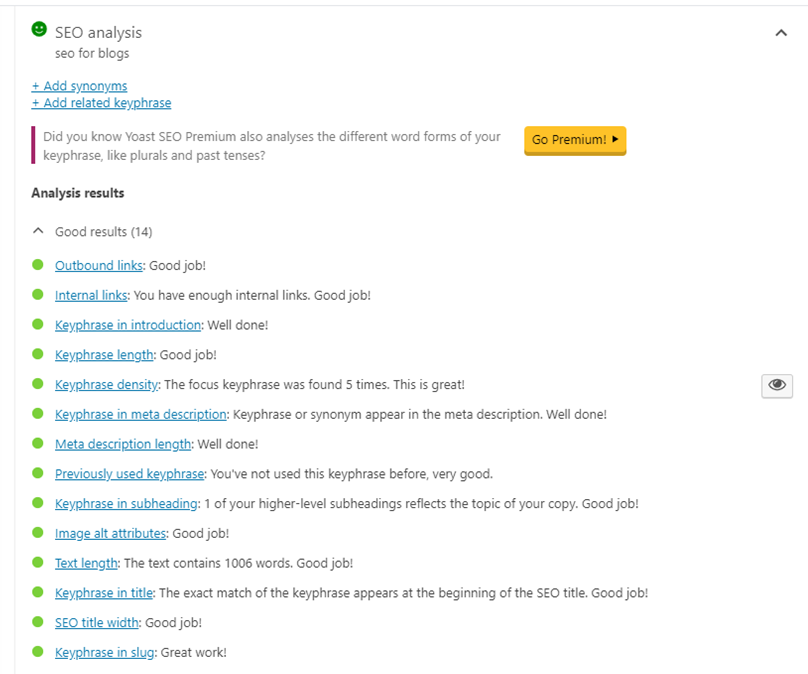
Below this, you also have the Yoast traffic lights which I find great at keeping me on track. They’re a good reminder of which bits of my SEO I still need to do and how many words I’ve written. Yoast has a fab post on their site about making your posts SEO friendly which you should check out. Below is how your Yoast will look if you do your SEO properly on every post.
2.3 Linking
There are two types of links you need within a blog post – internal and external. You need to be creating internal links within your own content and adding links to external sites too. For both types of link you want to consider what’s referred to as an anchor link. This is the words that you’ll click to take you to the other content. You don’t want to use the keywords that are in your post but you also don’t want to use “click here” either. For my own posts, I try and use the post title within the blog post and that becomes my anchor text. For the external link, it might be a company name or if its a sponsored post I’ll use the keywords provided for me.
Yoast will give you a warning if the links you’re adding to your blog post include your keyword. Sometimes this is unavoidable and in this case I would ignore Yoast and do it anyway. Sometimes I’ll alter my keyword so that it’s not a match. This is where judgement comes in and it’s not always as clear cut as always do x and not y.
2.4 The Content
Now that you’ve considered all of that you can write your blog post. You want to make sure that your content is over 300 words but it can’t be 300 words of drivel. The actual content you post is just as important as everything else. Essentially it needs to be of use to the reader. I see this as being a helpful post for bloggers (or even business owners) but it doesn’t provide a use for other people. It also needs to be relevant. I won;t title a post about SEO and write about a lipstick or equally that I don’t understand it. Hopefully you’re writing about a topic because you have a voice that people listen to for certain topics. I have the bloggers I always go to for certain types of content and that’s the way it should be. So consider what you’re writing and how you can make it useful and relevant to your audience.
2.5 Alt Text
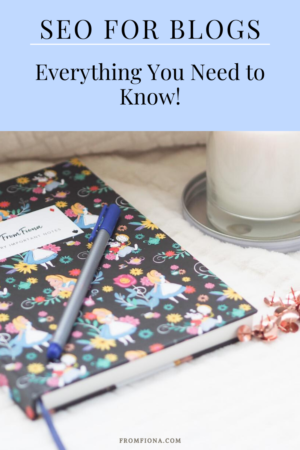
For best practice for Alt Text, I refer to the Moz website. They have the most up to date information on the subject and I’ve found it really easy to understand. They take you through the top tips for adding alt text to an image and how to make them accessible to screen readers. Essentially you want to describe the image in 125 characters or less but as descriptive as possible. I’ve put the alt text for the featured image and the pin image below for you to get an idea of what I mean and see the difference between the two and how you can add your keywords to alt text and keep it natural.
Featured Image
notebook, pen and candle flatlay
Pinterest Image
notebook candle and pen for seo for blogs pinterest image
Pin This For Later
Overall, SEO for blogs is one of the most important things you can do and I hope this post helps you with that. If you’re struggling with the technical side of anything or want to ask more questions then you can email me and we can work something out.